
To install Discord on an Ubuntu Linux system, you can install it as a Snap package through Ubuntu's App Center.
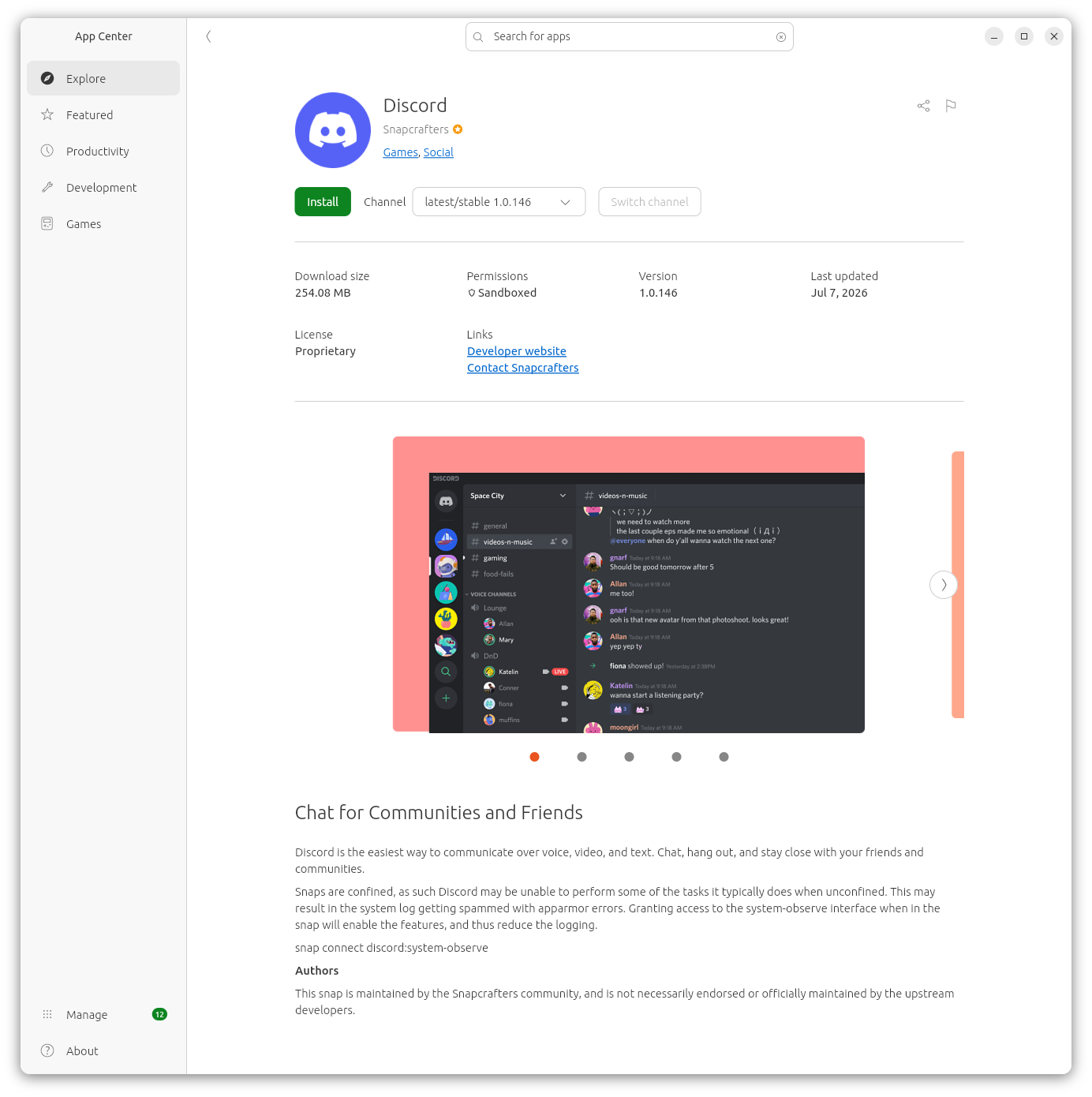
At the install screen, I saw the message below:
Snaps are confined, as such Discord may be unable to perform some of the tasks it typically does when unconfined. This may result in the system log getting spammed with apparmor errors. Granting access to the system-observe interface when in the snap will enable the features, and thus reduce the logging.
snap connect
discord:system-observe
AppArmor is a Linux kernel security module that provides system administrators the capability to restrict the access programs have to the system on which they run.
After installing the application, I issued the snap connect
discord:system-observe in a
GNOME Terminal
window and saw the output below.
$ snap connections discord
Interface               Plug                            Slot                            Notes
audio-playback          discord:audio-playback          :audio-playback                 -
audio-record            discord:audio-record            :audio-record                   -
camera                  discord:camera                  :camera                         -
content[gnome-42-2204]  discord:gnome-42-2204           gnome-42-2204:gnome-42-2204     -
content[gtk-3-themes]   discord:gtk-3-themes            gtk-common-themes:gtk-3-themes  -
content[icon-themes]    discord:icon-themes             gtk-common-themes:icon-themes   -
content[sound-themes]   discord:sound-themes            gtk-common-themes:sound-themes  -
desktop                 discord:desktop                 :desktop                        -
desktop-legacy          discord:desktop-legacy          :desktop-legacy                 -
gsettings               discord:gsettings               :gsettings                      -
home                    discord:home                    :home                           -
mount-observe           discord:mount-observe           -                               -
network                 discord:network                 :network                        -
network-observe         discord:network-observe         -                               -
opengl                  discord:opengl                  :opengl                         -
process-control         discord:process-control         -                               -
removable-media         discord:removable-media         -                               -
screen-inhibit-control  discord:screen-inhibit-control  :screen-inhibit-control         -
shared-memory           discord:shmem                   :shared-memory                  -
system-observe          discord:system-observe          -                               -
unity7                  discord:unity7                  :unity7                         -
wayland                 discord:wayland                 :wayland                        -
x11                     discord:x11                     :x11                            -
$
In the output of the snap connections, if a Plug is
connected to a Slot, then access is granted. If there is a dash, then
no connection exists and there is no access.
ChatGPT offered the following explanation for the system-observe interface:
The system-observe interface is a privileged Snap interface that gives a confined snap read-only visibility into many aspects of the host system. It is intended for monitoring, diagnostics, and system information tools rather than general-purpose applications.
With system-observe, a snap can access information such as:
Running processes and their metadata
CPU, memory, and load statistics
Kernel and operating system information
Some hardware and device information
System uptime and other status metrics
Various files under
/procand/systhat are normally restricted to confined snapsImportantly, system-observe does not grant write access or administrative control over the system. It is designed for observation, not modification.
Why isn't it connected automatically?Because the interface exposes information about the entire system—including other users' processes and system configuration—it can reveal sensitive information. For that reason, Snap treats it as a privileged interface, and it generally requires manual connection or approval by the Snap Store reviewers before it can be auto-connected.
Typical snaps that use itExamples include:
Why would Discord want it?
System monitoring tools
Performance profilers
Hardware information utilities
Diagnostics and troubleshooting applications
Some developer tools that inspect running processes
Discord itself doesn't normally require system-observe for its core functionality (chat, voice, video, and screen sharing). If a Discord snap declares this interface, it may be for features such as:
Detecting or integrating with running games (Rich Presence)
Collecting system information for diagnostics
Inspecting running processes to support certain desktop integration features
Whether it's actually used depends on how the snap is packaged and which features the maintainer has enabled.
In short, system-observe is a read-only system inspection interface: it allows a snap to learn about the host system but not to change it. Because of the amount of information it can expose, Ubuntu does not generally connect it automatically.
I connected the interface to Discord with the command sudo snap
connect discord:system-observe.
$ sudo snap connect discord:system-observe
[sudo: authenticate] Password:
$ snap connections discord | grep 'system-observe'
system-observe          discord:system-observe          :system-observe                 manual
$
When I then ran Discord, I saw a "Welcome back" window and an Authenticating message in a new tab in the default web browser on the system stating "Attempting to authenticate the Discord desktop client. Do not close this window."

Related articles: