
My wife had been using
DVDFab 13 under Microsoft
Windows 11 and wanted to continue to use it for
ripping DVDs after we
converted her desktop PC to
Ubuntu Linux. DVDFab 13
seemed to be working fine after I installed it using
Wine until after I
updated Wine to version 11.0 (you can see which version of Wine is present
by issuing the command wine --version in a
Terminal window).
When I tried to run DVDFab afterwards, though, I saw the message
“A debugger has been found running in your system. Please, unload
it from memory and restart your program.”
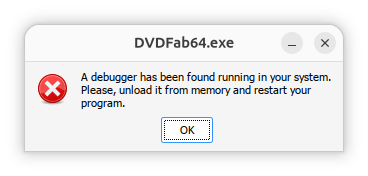
When I queried ChatGPT about the issue, it replied “This error is usually not caused by an actual debugger running on Ubuntu. DVDFab contains anti-debugging / anti-tamper checks, and under Wine or Proton those checks can sometimes incorrectly conclude that a debugger is attached.” It also stated that, for DVDFab 13 specifically, there is an issue when trying to run the program on later versions of Wine with the problem appearing with version 10.3 or later. The problem occurs on newer versions, even when no debugger is running. I decided to install the application under Bottles, which I had previously installed on the system with Flatpak, to see if the problem might not occur if I tried to run the application under Bottles, but the problem still occurred. I.e., I saw the "A debugger has been found running in your system. Please, unload it from memory and restart your program.” message. It took me a considerable amount of time to resolve the problem, but I was finally able to fix the issue by disabling DXVK and VKD3D in the settings for the DVDFab bottle.
[ More Info ]

