
Advanced Diary is a journaling/diary
application for Microsoft Windows systems developed by
CSoftLab. It stores the location of
the currently active datbase in the
Windows registry at
HKEY_CURRENT_USER\SOFTWARE\CSoftLab\Advanced Diary\Databases in
the key Database0. You can query the value from a
command prompt
using the reg query command
reg query "HKEY_CURRENT_USER\SOFTWARE\CSoftLab\Advanced Diary\Databases"
/v Database0
. You can change the value from a
command-line
interface (CLI) using the reg
add command.
C:\>reg query "HKEY_CURRENT_USER\SOFTWARE\CSoftLab\Advanced Diary\Databases" /v Database0

HKEY_CURRENT_USER\SOFTWARE\CSoftLab\Advanced Diary\Databases
    Database0    REG_SZ    Protocol=Local*Database=C:\Users\Alice\Documents\Advanced Diary\diary.dndb


C:\>
It stores the settings for automatic backups at
HKEY_CURRENT_USER\SOFTWARE\CSoftLab\Advanced Diary\Options.
The default option settings when no automatic backup has been set are
shown below.
C:\>reg query "HKEY_CURRENT_USER\SOFTWARE\CSoftLab\Advanced Diary\Options" | find "AutoBackup"
    AutoBackup    REG_DWORD    0x0
    AutoBackupPath    REG_SZ
    AutoBackupMode    REG_DWORD    0x0
    AutoBackupTime    REG_BINARY    4F5555555555D53F

C:\>
You can change the backup settings in the program by selecting Tools, then Options, then Backup from the Advanced Diary menu bar.
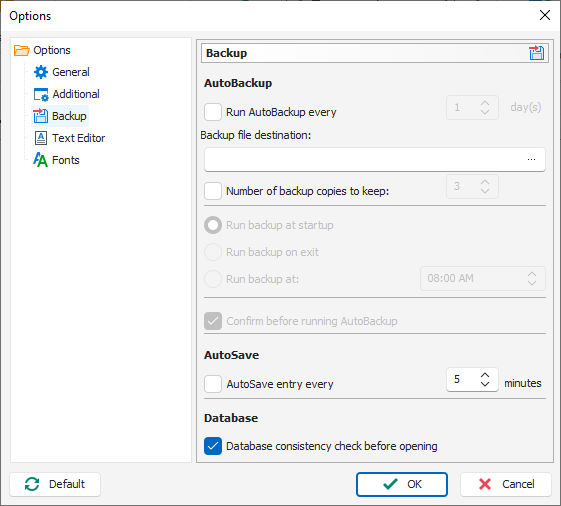
The registry settings when automatic backups have been turned on with a backup location specified and the default backup options left in place, e.g., every day, are shown below.
C:\>reg query "HKEY_CURRENT_USER\SOFTWARE\CSoftLab\Advanced Diary\Options" | find "AutoBackup"
    AutoBackup    REG_DWORD    0x1
    AutoBackupPath    REG_SZ    P:\alice\Advanced Diary Backups\
    AutoBackupMode    REG_DWORD    0x0
    AutoBackupTime    REG_BINARY    4F5555555555D53F

C:\>
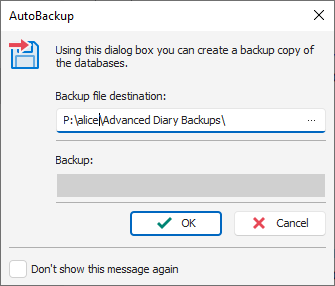
When you turn on the backup option, the next time you start the program you will see a AutoBackup window prompting you to OK a backup. if you leave the "Confirm before running AutoBackup" option checked.
The "AutoSave" option is stored in the registry at AutoSave
under HKEY_CURRENT_USER\SOFTWARE\CSoftLab\Advanced Diary\Options.
The default value is zero. With "AutoSave entry ever 5 minutes" turned on
the value will be "1" as shown below.
C:\>reg query "HKEY_CURRENT_USER\SOFTWARE\CSoftLab\Advanced Diary\Options" /v AutoSave

HKEY_CURRENT_USER\SOFTWARE\CSoftLab\Advanced Diary\Options
    AutoSave    REG_DWORD    0x1


C:\>
The value in minutes for the interval at which automatic saves are performed
is stored in the AutoSaveInterval key. The key that controls
whether the user is prompted to confirm backups is stored in the
BackupConfirmation key. A value of "0" indicates that confirmation
is not required.
C:\>reg query "HKEY_CURRENT_USER\SOFTWARE\CSoftLab\Advanced Diary\Options" /v AutoSaveInterval

HKEY_CURRENT_USER\SOFTWARE\CSoftLab\Advanced Diary\Options
    AutoSaveInterval    REG_DWORD    0x5


C:\>reg query "HKEY_CURRENT_USER\SOFTWARE\CSoftLab\Advanced Diary\Options" /v BackupConfirmation

HKEY_CURRENT_USER\SOFTWARE\CSoftLab\Advanced Diary\Options
    BackupConfirmation    REG_DWORD    0x0


C:\>
Related articles:
-
Obtaining a command prompt in Windows 11
Date: August 14, 2023 -
Remotely Enabling Remote Desktop Protocol From the Command Line
Date: April 11, 2009 -
Checking Microsoft Windows proxy server
settings
Date: January 7, 2015

