Determining the default file manager application under Ubuntu
The file command
can be used on a Linux
system to determine what type of data a file holds, e.g.,
file Untitled.png. You can determine the
media type, aka
MIME type, by using
the --mime-type option for the file command. E.g.,
file --mime-type Untitled.png. You can determine which application
is the default application for opening files of that
file type using the
xdg-mime
command — the
xdg-mime program is a command line tool that can be used to determine
what application handles a particular file type. E.g., xdg-mime
query default image/png — you need to specify the filetype
in the "minor/major" format that xdg-mime expects, which is what you see
in the output of the file --mime-type command.
$ file Documents/Untitled.png
Documents/Untitled.png: PNG image data, 597 x 113, 8-bit/color RGBA, non-interlaced
$ file Documents/tea.html
Documents/tea.html: ASCII text, with very long lines (6229)
$ file --mime-type Documents/Untitled.png
Documents/Untitled.png: image/png
$ xdg-mime query default image/png
org.gnome.Loupe.desktop
$ file --mime-type Documents/Cocoa-Lead.odt
Documents/Cocoa-Lead.odt: application/vnd.oasis.opendocument.text
$ xdg-mime query default application/vnd.oasis.opendocument.text
libreoffice-writer.desktop
$
The default file
manager for Ubuntu
Linux is GNOME Files.
You can make another application the default file manager, if you like.
Some alternatives are
Thunar,
Nemo,
Krusader, or
Dolphin.
You can determine which application is the default file manager with the
command xdg-mime query default inode/directory. You can set
the default file manager with the command xdg-mime default
fmgr.desktop where fmgr is the filemanager you wish to
use.
[ More Info ]
[/os/unix/linux/ubuntu]
permanent link
Turning off Autocorrect on an Android phone
I have a Google Pixel 9
phone which uses the
Android
operating system. Though I have been happy with the phone, I find its
autocorrection feature to be awful. When I'm typing in the
Google Keep Notes
application and in text messages, the autocorrection feature will replace
correctly spelled English words with other words that are unrelated to
what I'm trying to write. Often the replacement word leads to a sentence
making no sense or giving it a meaning I don't intend. I consider the
Google autocorrection feature to be far more of an annoyance than a help.
The feature can be turned off by the following steps:
-
Drag your finger down from the top of the screen until you see a menu
of options.
-
Tap on the gear icon at the bottom, right-hand corner of the screen to
get to the settings menu.
-
Tap System.
-
Tap Keyboard under Interaction.
-
Tap On-screen keyboard.
-
Tap Gboard.
-
Tap Corrections & suggestions.
-
Tap Turn off autocorrect.
-
When you've changed the setting you can exit from the options
selection.
[ More Info ]
[/os/android]
permanent link
Unable to access minimized Collectorz windows
My wife and I have been using the Microsoft Windows desktop versions
of CLZ's database programs for managing
book, comic, and movie collections for many years. We've found the Collectorz
database programs to be
well-designed and very useful, but we've encountered some issues getting the
programs to work correctly on her
Ubuntu Linux system, though
I would note that the software was developed for Microsoft Windows
operating systems
and the company doesn't indicate they are supported under Linux.
One problem we encountered is that after installing the programs under
Wine, when she
opened one of the programs, e.g., Movie Collector, and then minimized it
or switched to another application with Alt-Tab, she was unable to
switch back to the Collectorz program. Alt-Tab would not work nor
would the
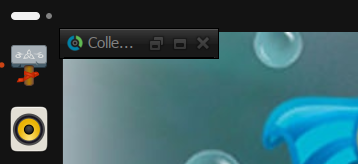
Super key plus Tab key combination. There would be a small window
at the upper, left-hand corner of the screen indicating the program was
running, but clicking on it would not allow her to enlarge the window to
work in the application again and there didn't appear to be any way to
enlarge or maximize the window.
I was able to resolve the problem with minimizing the application or
switching from it without re-creating a problem opening files by checking the
Emulate a virtual desktop option under the Graphics
tab for winecfg instead.
[ More Info ]
[/os/unix/linux/wine/collectorz]
permanent link
Application failed to initialize NO_ANSWER_FROM_MAKEMKVCON
I had installed
MakeMKV from source files on an Ubuntu Linux system . It had been
working then, but when I tried to run the program today, I saw the
message "Application failed to initialize NO_ANSWER_FROM_MAKEMKVCON".
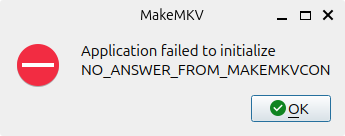
I had updated the operating system and other applications on the system
in the intervening months, so I knew it was possible that the upgrade changed or
removed libraries that makemkvcon depends on. I had upgraded the operating
system from Ubuntu
25.10 (Questing Quokka) to 26.04
LTS (Resolute Racoon). The error means the MakeMKV graphical
user interface (GUI) can't communicate with its backend console
process, makemkvcon. I.e., the GUI is waiting for a response from
makemkvcon and that process isn't starting or is crashing, possibly because
of a missing required dependency such as a missing or changed library file.
To try to determine if that was the case and, if so, which library might be
associated with the problem, I ran makemkvcon from a terminal window.
alice@Wonderland:~$ which makemkvcon
/usr/bin/makemkvcon
alice@Wonderland:~$ makemkvcon
makemkvcon: error while loading shared libraries: libavcodec.so.61: cannot open shared object file: No such file or directory
alice@Wonderland:~$
I was able to resolve the problem by reinstalling
MakeMKV from the source files. When I did
that and re-registered the application, it started normally.
[ More Info ]
[/os/unix/linux/ubuntu/MakeMKV]
permanent link
Thunar on Ubuntu
My wife was dissatisfied with the default
file manager,
GNOME Files, aka
Nautilus, on her Ubuntu
Linux desktop system. You can determine the default file manager from a
terminal window
by issuing the command xdg-mime query default inode/directory,
which will show you what application opers directories.
$ xdg-mime query default inode/directory
org.gnome.Nautilus.desktop
$
You can also check on whether one of several common file managers, such
as Nautilus, Thunar,
Dolphin, or
Nemo, which is a
fork of
Nautilus, is currently running with ps aux | grep -E
'nautilus|thunar|dolphin|nemo'. I saw that I had previously
installed the Krusader file manager when I checked for file manager
desktop entries with grep -l "inode/directory"
/usr/share/applications/*.desktop.
$ grep -l "inode/directory" /usr/share/applications/*.desktop
/usr/share/applications/org.gnome.baobab.desktop
/usr/share/applications/org.gnome.Nautilus.desktop
/usr/share/applications/org.kde.krusader.desktop
$
But I didn't think the
Krusader interface would appeal to her as she wanted a file manager
that provided an interface more similar to the one for the Windows Fle Explorer
that she had on her Windows 11 system, so I issued the command
sudo apt update and then sudo apt install thunar,
which installed thunar 4.20.7 — after installation, you can check the
version of Thunar with thunar --version.
I then made Thunar the default file manager with
xdg-mime default thunar.desktop inode/directory. If you run
the command xdg-mime query default inode/directory, you should
see thunar listed when it has been made the default handler for directories.
$ xdg-mime default thunar.desktop inode/directory
$ xdg-mime query default inode/directory
thunar.desktop
$
I then unpinned the GNOME Files (Nautilus) app by right-clicking on the
icon for it and selecting Unpin. I then pressed the
Super
key along with the "A" key, and typed thunar in the "Type to
search" filed and then right-clicked on thunar when I saw it returned
and selected "Pin to Dock" so she could open it the way she was opening
GNOME Files.
To make the left pane of the Thunar window act like Explorer on Microsoft
Windows operating systems, I configured it to expand a directory to show
subdirectories if she clicked on it. To do so, I changed Thunar's
sidebar style from the default "Shortcuts" to "Tree, which can be done
by selecting View, then Side Pane and then selecting
Tree, which changes the left pane to provide an expandable
directory tree. As with the Windows File Explorer, you can toggle
the display of hidden files. I turned that option on by pressing the
Ctrl and H keys simultaneously — the option can
be toggled off again by using the same key combination.
[ More Info ]
[/os/unix/linux/ubuntu]
permanent link
Wine Iexplore unable to access webpages via HTTPS and Collectorz database programs
Wine allows
you to run programs developed for Microsoft Windows systems under
Linux. It comes with its
own version of the
Internet Explorer browser. I encountered problems when attempting to
access webpages via
HTTPS with
that browser under Wine, though access via
HTTP worked
fine. When I tried accessing pages via HTTPS, I would see only
a blank page. I discovered that problem while trying to resolve
problems with the installation of Windows desktop programs from
Collectorz to manage our book, comics,
game, and movie collections — I was seeing "Error while connecting
to server: 276: Server certificate verification failed. Connection
aborted" messages when trying to register the programs with our Collectorz
account's userid and password. I was able to eliminate the problem with
the Collectorz desktop database programs by resolving the problem with
Wine's version of the Internet Explorer browser.
[ More Info ]
[/os/unix/linux/wine/collectorz]
permanent link


