
MoonPoint Support Logo


Advanced Search
Search:
Entire Site This Topic Only
Match:
Any All
Partial Whole Words only
March
Sun Mon Tue Wed Thu Fri Sat
12 13 14
15 16 17 18 19 20 21
22 23 24 25 26 27 28
29 30 31        
2026
Months
Mar
Apr May Jun
Jul Aug Sep
Oct Nov Dec


Fri, Feb 15, 2008 7:02 pm

216-115-223-200.expertcity.com HTTPS Access

While monitoring a LAN with Show Traffic, a network monitoring application for Windows systems, I noticed two systems contacting 216.115.223.200 [ 216-115-223-200.expertcity.com ] on port 443 (HTTPS).
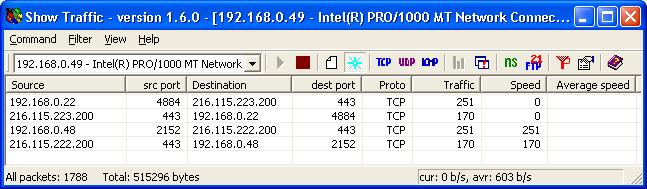
Show Traffic detection of traffic to 216.115.223.200

Since the communications occurred at 18:30 when the employees using those systems would have gone home, I did a Google search on the FQDN, 216-115-223-200.expertcity.com, which was associated with that address. A McAfee SiteAdvisor webpage linked the site with GoToMeeting, i.e. legitimate software on the users' systems. That webpage stated "When we installed and ran GoToMeeting 2.0.0.127 (gotomeeting.exe), the following network servers were contacted." It then listed the following addresses:

216-115-222-200.expertcity.com
216-115-223-200.expertcity.com

[/os/windows/network/monitoring/show_traffic] permanent link

Fri, Feb 15, 2008 5:08 pm

Show Traffic 1.6.0

While looking for an application to monitor network traffic that would run under Microsoft Windows, I came across Show Traffic. The author came across Trafshow for Linux and decided to create a program with equivalent functionality for Windows.

The program provides a GUI interface for monitoring the traffic seen at a particular network interface. It displays statistics for the bytes transferred for connections between various systems and the bandwidth used for those individual connections.

[ More Info ]

[/os/windows/network/monitoring/show_traffic] permanent link

Valid HTML 4.01 Transitional

Privacy Policy   Contact

Blosxom logo