Sat, Mar 31, 2007 3:15 pm
Saving YouTube Videos
YouTube doesn't offer a way for you
to easily download videos from the site, but there are other webssites where
you can paste the URL of the video you wish to download and then download
it from those sites.
[ More Info ]
[/video/youtube]
permanent link
Sun, Mar 25, 2007 11:13 pm
Setting Up Samba on A DocuSP Solaris 10 System
I needed to set up file sharing access to a Xerox DocuSP system running the
Solaris 10 operating system, which was controlling a
Xerox DocuColor 250 device. Xerox recommends using Samba, which is already
on the Solaris system to share a directory to Windows systems. Since I
encountered some problems setting up the system using the instructions
Xerox provided, I've written my own instructions in case I have to repeat
the process again or should anyone else also need to implement the same
file sharing.
[ More Info ]
[/os/unix/solaris]
permanent link
Fri, Mar 23, 2007 7:30 pm
Using Google's Cache
If you encounter a "file not found", "internal server error", "cannot find
server or DNS Error" when trying to access a webpage, you may still be
able to access the webpage by viewing a saved copy of it in
Google's Cache or
at the
Internet Archive,
aka Wayback Machine.
[ More Info ]
[/network/web/search]
permanent link
Thu, Mar 22, 2007 5:55 pm
Adding Printer from Command Line
I was logged into a system using an ordinary user account under Windows XP
and needed to create a new printer port so that I could print to an HP
printer, which was on the network to which I was connected. The user account
doesn't have access to add network printers, but I had a lot of applications
open with ongoing work and didn't want to have to save and close everything I
was working on, log off, login as the administrator, log off, log back
in under the user account and reopen all the applications and files,
especially since I only had a few minutes to get a document printed prior
to a meeting.
Fortunately, I was able to find information on how to easily resolve my
problem at
Command Line Printer Control in Windows 2000 / XP. All I had to do to
add a printer from the administrator account while still remaining logged into
my user account was the following:
- Open Windows Explorer and navigate to
C:\WINDOWS\system32.
-
Right-click on cmd.exe while holding down a shift key, then
select Run as.
-
Select "The following user", put in the userid for the administrator
account for the system, e.g. SystemName\administrator, for user
name and its password, then click on OK.
-
At the command prompt window that opens, enter the following command:
RUNDLL32 PRINTUI.DLL,PrintUIEntry /il
That will run the Add Printer Wizard from the administrator account,
allowing you to add a printer port.
Note: The capitalization of PrintUIEntry is important.
If you don't use PrintUIEntry, but, instead used
printUIEntry, you would get the error message below:
Error in printui.dll

Missing entry:printUIEntry
The /il parameter is also case sensitive.
References:
-
Command Line Printer Control in Windows 2000 / XP
Rob van der Woude's Scripting Pages
[/os/windows/printers]
permanent link
Wed, Mar 21, 2007 9:13 pm
Updating Plushelp Information in TinyMUSH
If you have updated the plushelp.txt file in
TinyMUSH, you can make
the information available within the
MUSH by taking the following
steps:
-
After editing the plushelp.txt file, within the directory where the
plushelp file is located, issue the following command to rebuild the
plushelp index file:
./mkindx plushelp.txt plushelp.indx
Alternatively, you could run ../Index to rebuild all index files.
-
Within the MUSH, issue the command
@readcache
References:
-
TinyMUSH 3: The Home Page
sourceforge.net
- MUSH
Wikipedia, the free encyclopedia
-
root/releases/1.50/11/README
PennMUSH
[/gaming/tinymush]
permanent link
Thu, Mar 15, 2007 1:05 am
Checking User VPN Connections on SBS 2003
If you need to check on who is logged into a Windows
Small Business (SBS) 2003 server via a VPN connection
you can do so by using
Routing and Remote Access
under
Start then
Administrative Tools.
For analyzing the log files for information on VPN logins
through the SBS 2003 server, Microsoft offers the iasparse
tool, which can be found on Disc # 2 of the installation CDs.
But the shareware tool,
IAS Log Viewer, is better at displaying the data in a more
manageable fashion.
[ More Info ]
[/os/windows/server2003]
permanent link
Mon, Mar 12, 2007 10:03 pm
Why Do I See a Lot of Strange Symbols When I Compose an Email Message
If you are seeing a lot of unexpected symbols when you are composing
an email message in Outlook 2003, such as the ones shown below, then you may
have accidentally turned on the display of nonprinting characters.
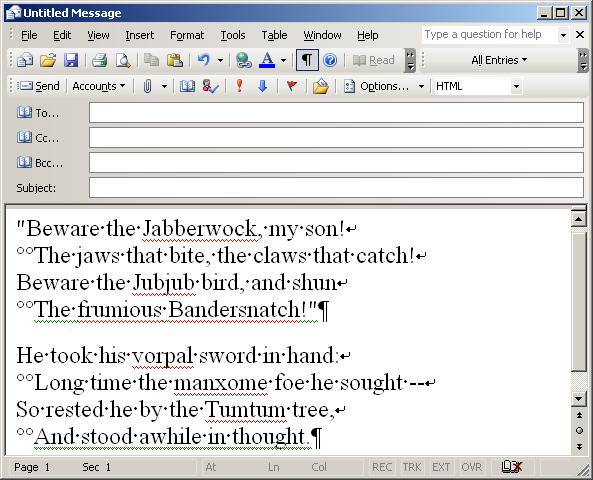
You may be seeing ¶ symbols at the end of each paragraph. Those
are called "para symbols" or "pilcrow signs". You may also see
 symbols.
Those downwards arrows that turn a 90-degree corner leftwards indicate
line breaks or carriage returns in your text. These
carriage return arrows should appear wherever you've hit the return key when
composing a message. You will also see small raised dots between words,
i.e. "He
symbols.
Those downwards arrows that turn a 90-degree corner leftwards indicate
line breaks or carriage returns in your text. These
carriage return arrows should appear wherever you've hit the return key when
composing a message. You will also see small raised dots between words,
i.e. "He  took
took
 his
vorpal
sword". The character simply means that
there is a space there.
his
vorpal
sword". The character simply means that
there is a space there.
If Outlook is configured to use Microsoft Word to edit your email
messages, those characters are embedded in your documents, but are
normally invisible to you. Displaying them can help some users when
formatting their documents.
You can toggle their display on or off by clicking on the 
symbol that you should see in the toolbar menu at the top of your
message composition window. You can also toggle the display of
these characters on or off by hitting the Ctrl, Shift, and "8" keys,
i.e. Ctrl then asterisk, simultaneously. And, if those characters
have suddenly appeared in your documents when you don't want them there,
it is likely because you inadvertently hit the Ctrl key while hitting
Shift+8 to get an asterisk symbol.
References:
-
What do all those funny marks, like the dots between the words in
my document, and the square bullets in the left margin, mean?
Frequently Asked Questions - Microsoft Word MVP FAQ Site
Article contributed by Suzanne
Barnhill and
Dave Rado
-
Turning Display of Paragraph Markers On and Off in Microsoft Word
MoonPoint Support
-
List of XML and HTML character entity references
Wikipedia, the free encyclopedia
[/os/windows/office/outlook]
permanent link
Sat, Mar 10, 2007 9:52 pm
Upgrading TinyMUSH 3.0 to 3.1
I upgraded TinyMUSH roleplaying software from version 3.0 to version 3.1.
[ More Info ]
[/gaming/tinymush]
permanent link
Fri, Mar 09, 2007 10:09 pm
Finding a String with a Recursive Grep
If you need to find a specific string in all files of a particular
type in the current directory and all directories beneath it, you
can use a command similar to the following:
find . -name "*.php" -exec grep "noindex" {} /dev/null \;
In this case I want to find all of the PHP files where I have included
the string "noindex" in a META tag.
References:
-
Greg Hinkel's UNIX Tip of the Week for March 3, 1996
[/os/unix/commands]
permanent link
Mon, Mar 05, 2007 10:56 pm
Correcting Poor Print Quality on an HP Business Inkjet 2800 Printer
A user of an HP Business Inkjet 2800 printer was having problems with
poor print quality for printouts. Characters were smudged or there
were gaps in printing. I've posted tips from the
HP Business
Inkjet 2800 series Toolbox for alleviating the problem.
[ More Info ]
[/hardware/printer/hp]
permanent link
Fri, Mar 02, 2007 1:37 pm
Excluding the Quarantine Directory from a ClamWin scan
Unless you tell it to exclude it's own quarantine directory,
ClamWin will scan that
directory when you perform a scan of the entire hard disk
or any directory that contains the quarantine directory beneath
it. When it encounters already quarantined items, ClamWin will
put a numerical value at the end as an extension, e.g. "000".
A subsequent scan will repeat the process, so a file may then
get the extension "000.000".
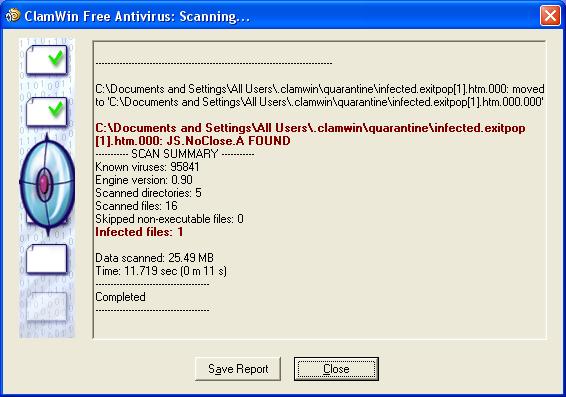
I don't want ClamWin to scan its own quarantine directory and
report infections for items it quarantined during previous
scans. To avoid that result, you can take the following steps
(instructions written for ClamWin 0.90, but should apply
to other versions as well):
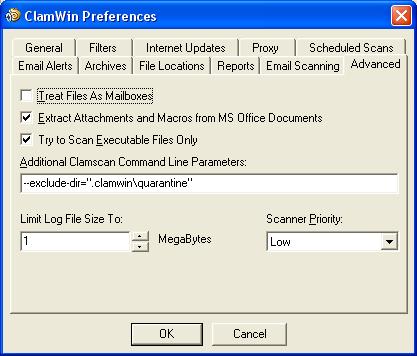
- Open ClamWin.
- Click on Tools and select Preferences.
- Click on the Advanced tab.
- Put
--exclude-dir=".clamwin\\quarantine" in the
Additional Clamscan Command Line Parameters field. Note:
you must use two backslashes after "clamwin", because ClamWin
treats the entry as a regular expression. In a regular expression,
a backslash, "\", has special significance, so you need to "escape"
that special significance by putting another backslash in front
of any backslash you need to use.
If you wish to exclude multiple directories, you can use multiple
--exclude-dir commands separated by spaces, e.g.
--exclude-dir=".clamwin\\quarantine"
--exclude-dir="BitDefender8\\Quarantine"
.
To exclude individual files, you can use the exclude command,
e.g. exclude="test.exe".
[/security/antivirus/clamav]
permanent link

Privacy Policy
Contact

