Mon, Mar 30, 2026 9:51 pm
Setting the default application to open PDF and EPUB files in Wine
I installed Wine
on an Ubuntu Linux
system to be able to run Microsoft Windows applications on it. I
installed Sumatra
PDF to view PDF and
EPUB files. When
I double-clicked on EPUB files in the Wine
File Explorer
window, which you can run by issuing the command wine explorer
in a Terminal
window, or wine explorer &, if you wish to open it and
immediately return to the
shell prompt,
I saw an Error window which stated "There is no Windows program
configured to open this type of file." If I double-clicked on a PDF file,
it would open in the
GNOME Document Viewer
application. I was able to set the default application for opening those
files under Wine with the following steps:
-
From the Bash prompt in a Terminal window, run the Wine
registry
editor program to modify the
Windows
Registry with
wine regedit.
-
Navigate to
HKEY_CLASSES_ROOT\.epub and set
(Default) = epubfile. If you don't see a .epub
entry, right-click on HKEY_CLASSES_ROOT and choose New.
You can press the F5 key or choose View and Refresh to
refresh the display to show the new entry in alphabetical order.
-
If you then click on the
.epub entry, you will see
(Default) under Name, REG_SZ
under Type, and (value not set) under Data.
-
Double-click on the entry and then type
epubfile in the
Value data field and then click on OK.
-
Then navigate to
HKEY_CLASSES_ROOT\epubfile\shell\open\command,
if it exists. If there is no epubfile entry you can create one by
right-clicking on HKEY_CLASSES_ROOT and selecting
New and Key giving the new key a name of
epubfile. Then double-click on the (Default) entry
under the new key and type EPUB Document in the Value
data field. Then right-click on the epubfile key
and choose New and Key and type shell for
the name. Right-click on shell and create a new, open
beneath it. Then right-click on open and create a new key,
command beneath open.
-
Then right click on the command key and choose New then
String Value.
-
Double-click on the new (Default) entry under command
and then type the location and file name for the application that you
wish to use to open .epub files within double quotes followed by a space
and then
"%1", e.g.
"C:\Program Files\SumatraPDF\SumatraPDF.exe" "%1", if
you wish to open the files with Sumatra PDF and you installed it so
that it is accessible to all users of the system. Or use
"C:\users\username\AppData\Local\SumatraPDF\SumatraPDF.exe
" "%1"
, where username is the relevant username, if you chose
to install it just for the current user when you installed it.
[ More Info ]
[/os/unix/linux/wine]
permanent link
Sun, Mar 29, 2026 8:58 pm
Installing MakeMKV on a Ubuntu Linux system
After trying unsuccessfully to get the
Snap package of
MakeMKV working on
an
Ubuntu Linux system
(see
Installing the MakeMKV
Snap Package on a Ubuntu Linux system), I uninstalled the Snap version
and installed the software from the
source code.
Though installing the application from source code involved more steps,
I was able to successfully install and then rip a couple of discs in far
less time than I spent trying to get the Snap version to work.
[ More Info ]
[/os/unix/linux/ubuntu]
permanent link
Sat, Mar 28, 2026 1:28 pm
Updating file locations in Book Collector
Collectorz now appears to be focusing
on their mobile and web-based products
for managing book collections, but they also provide a desktop
Book Collector desktop application for systems running Microsoft
Windows, though I don't even see a link for it on the homepage of
their website nor do I see one in their
sitemap webpage. However, if you are using the desktop product and
need to update your Book Collector database if the location of cover images,
thumbnails, list item images, templates, and/or local files for
entries already in the datbase, you can take the steps below.
You can specify the directories for new entries by clicking on
Tools, Options, Folders to set the
directories Book Collector should use by default.
Inside the Book Collector program, click on Tools then
select Update File Links. In the Update File Links
window you can "choose the kind of files you would like to repair". I left
the default value of All Types, but you can also select Front
Cover, Back Cover, Pick List Image, Pick List
Template Image, Local File, or Backdrop.
When you click on Next Step, you can choose to have the program
automatically update the old folder to the new folder or you can choose
to do it manually. With the automatic option, you can "Select a base
folder and let the program find the missing files automatically" while
with the manual option you can "Use a find and replace action to
manually fix your file paths". For the "Choose folder where to
find files", browse to the appropriate directory where the files are
now located. Check the box next to "Include subfolders", if that is
appropriate, and then click on Next step. The program will then
show a "Finding best matches for missing files" window with a progress
bar as it updated links.
At the next step, Step 4, you can see the resulting file paths
and click on the Update File Links button to finalize the
changes. You will then see the number of file links that will be updated
and asked if you are sure to proceed. I saw a window with a message that
Book Collector was not responding, but I chose "Wait" several times and
it finally completed. When all the links are updated, you should see
a window informing you of the number of file links updated.
If you updated the location for the images for books already in the
database, you should now see the images appear for book entries.
If you just need to update the links for a particular kind of files,
e.g., the local files, or the location of those files differs from
the location of other files, e.g., if they are on a different drive than
the images, etc., at Step 1 where you "choose the kind of files you
would like to repair", you can choose that file type instead of "All
Types".
I was able to use the above steps when transitioning my wife's desktop
computer from Windows to
Ubuntu Linux, after I installed Book Collector under
Wine, to
specify the new location of image and local files.
[ More Info ]
[/software/database/collectorz]
permanent link
Wed, Mar 25, 2026 4:39 pm
Ejecting a Disc with PowerShell
I needed to eject a
optical disc
drive tray from a
command-line
interface (CLI) on a system running Microsoft Windows 11 so that
I could insert a DVD in the drive. That can be done using the
Powershell
command powershell (New-Object -ComObject
WMPlayer.OCX.7).cdromCollection.item(0).Eject(), which will
eject the tray of the first optical drive found by Windows Media Player's
COM object.
PS C:\> powershell (New-Object -ComObject WMPlayer.OCX.7).cdromCollection.item(0).Eject()
Windows PowerShell
Copyright (C) Microsoft Corporation. All rights reserved.

Install the latest PowerShell for new features and improvements! https://aka.ms/PSWindows

PS C:\>
[/os/windows/PowerShell]
permanent link
Tue, Mar 24, 2026 9:15 pm
Could not initialise OpenGL support
I downloaded a YouTube
video on a Ubuntu Linux
with yt-dlp.
When I tried to view the downloaded
WebM file with the default
video application, Videos, also known as Totem, which is an application for
playing videos that is provided with Ubuntu, I saw the message below:
Ⓧ
An error occurred
Could not initialise OpenGL support
OK
When I opened the video with
VLC, which I had
previously installed, I heard audio, but no video was displayed. I checked
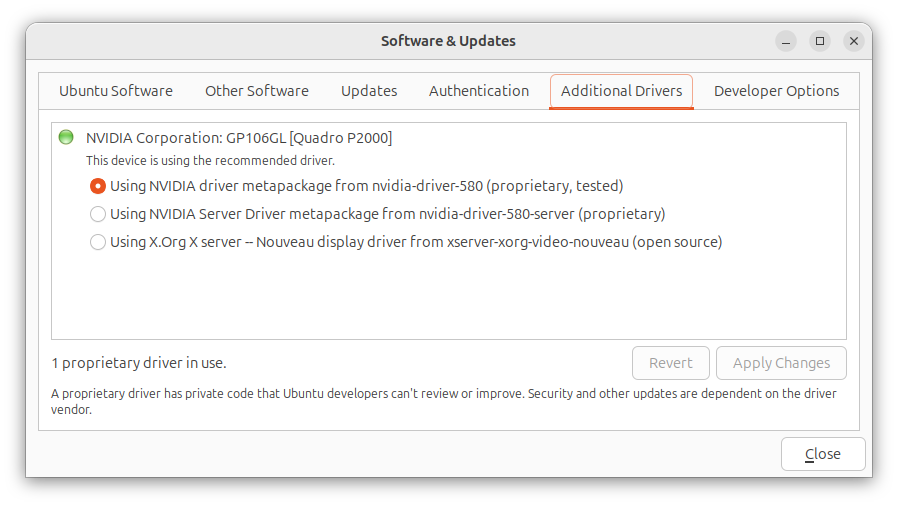
to see if the Nvidia
driver was up-to-date since the system had an Nvidia graphics card, but they
were up-to-date. You can check that by clicking on the Show Apps
button at the lower-right-hand corner of the screen Ubuntu desktop. Then type
Software Updates in the "Type to search" field. Click on
Software & Updates and then click on the Additional
Drivers.
To resolve the problem, I added the following line to the
/etc/environment file with a
text editor:
GDK_GL=gles
When I rebooted the system, I was then able to view the video with
the default Videos application, though when I tried playing it in
VLC I could hear audio, but did not see video.
[/os/unix/linux/ubuntu]
permanent link
Tue, Mar 24, 2026 9:10 pm
No video shown when playing a WebM file in VLC
When I tried to play a
YouTube video I
downloaded as a WebM file
using
yt-dlp on an Ubuntu
Linux system in the
VLC media player application, I could hear the audio, but no video
was shown. I tried opening a few other .webm videos and found I was able
to view the video in some, but not others, though I was able to view
the video and hear the audio in all the .mp4 and .mkv files. I tried
changing the video output setting from "Automatic" to "OpenGL video
output" and then "XVideo output (XCB)", which you can do by clicking on
Tools, then Preferences, then Video, and then
selecting those options from the dropdown list next to Output, but
neither of those options resolved the problem, so I reset Output
to Automatic. I was able to resolve the problem by taking the
following steps, though:
-
In the VLC program, click on Tools and then select
Preferences.
-
Click on Input/Codecs and change the hardware-accelerated
decoding setting by clicking on the downward arrowhead next to
Automatic, which will be the setting if the default setting is
in effect.
-
Change the setting to Disable and then click on Save.
When I checked the Codec
information for the file where I could not view the video before disabling
the hardware-accelerated decoding setting, which you can do by opening
an audiovisual
(AV) file in VLC and then selecting Tools and Codec
Information, I saw the video codec was AOMedia's AV1 Video
(av01). When I checked the video codec for another WebM file where
the video wasn't visible in VLC, I saw it was also the AOMedia's AV1
Video (av01) codec. Checking the video codec for .webm files where
I could view the video, I saw Google/ON2's VP9 Video (VP90)
for some and H264 - MPEG-4 AVC (part 10) (avc1) for another.
Note: you can also determine the codecs used in a file using the
mediainfo utility, which you can install on an Ubuntu system with
sudo apt-get install mediainfo. You can check on whether
it is already installed using the command which mediainfo,
which would show the location of the mediainfo executable file if the
application was installed, or you can use dpkg -s mediainfo,
which will show details on the mediainfo package if it is installed.
[/software/audio_video/VLC]
permanent link
Thu, Mar 12, 2026 7:48 pm
Concatenating videos with FFmpeg
The
FFmpeg video handling
utility can be used to join videos together into one larger video. If the video
files are
MPEG-1,
MPEG-2, MPEG
Program Stream (PS)
, or
Digital Video
(DV) files, you can use a Direct Stream copy method, by issuing a command in
the form
ffmpeg -i "concat:input1.mpg|input2.mpg" -c copy
output.mpg
. Using ffmpeg for the concatenation operation ensures that
file headers and timestamps are handled correctly, whereas using operating
system commands such as
cat on a Linux system or
copy /b on a Microsoft Windows system may produce payback issues.
This method can not be used for
MPEG-4 files, however.
Another method that can be used for MP4 files, as well as the above
file types is the Concat Demuxer method,
if the files use the same
codecs and parameters, such as
resolution,
framerate, etc.
If the files have the same characteristics, you can use a command of the form:
ffmpeg -f concat -safe 0 -i inputFileList.txt
-c copy output.mp4
[ More Info ]
[/video/ffmpeg]
permanent link
Wed, Mar 11, 2026 5:17 pm
Trimming a video with FFmpeg
FFmpeg provides a
suite of
command-line
interface tools for working with audio and video files. It is
free and
open-source software that is available for a variety of
operating systems,
including
Microsoft Windows,
Linux, and
macOS. If you wish to
use it on a Microsoft Windows system, you can install it with the
Windows
Package Manager known as winget by
opening a command prompt window
and issuing the command winget install "FFmpeg (Essentials Build)".
Microsoft Windows [Version 10.0.26100.7623]
(c) Microsoft Corporation. All rights reserved.

C:\Windows\System32>winget install "FFmpeg (Essentials Build)"
Found FFmpeg (Essentials Build) [Gyan.FFmpeg.Essentials] Version 8.0.1
This application is licensed to you by its owner.
Microsoft is not responsible for, nor does it grant any licenses to, third-party packages.
Downloading https://github.com/GyanD/codexffmpeg/releases/download/8.0.1/ffmpeg-8.0.1-essentials_build.zip
  ██████████████████████████████   101 MB /  101 MB
Successfully verified installer hash
Extracting archive...
Successfully extracted archive
Starting package install...
Command line alias added: "ffmpeg"
Command line alias added: "ffplay"
Command line alias added: "ffprobe"
Path environment variable modified; restart your shell to use the new value.
Successfully installed

C:\Windows\System32>
If you need to trim the beginning of a video file, such as a .mp4 file,
you can do so using a command of the form
ffmpeg -ss hh:mm:ss -i input.mp4 -c copy output.mp4 where
you specify the point you wish the video to start in the form hh:mm:ss
for hours, minutes, and seconds with -ss and
input.mp4 is the file you wish to trim and output.mp4
is the name you wish to give to the trimmed file. E.g., if I have a video
file, REC-0001-A.mp4, where I wish to discard audio and video up to the 3
minutes and 34 seconds mark in the file, I can use ffmpeg -ss 00:03:34 -i REC-0001-A.mp4 -c copy output1.mp4 to create a new file, output1.mp4,
that omits the first 3 minutes and 33 seconds from the input file. Using the
-c copy option copies the video/audio streams directly,
which is fast but can be less accurate on
keyframes.
[ More Info ]
[/video/ffmpeg]
permanent link
Thu, Mar 05, 2026 3:30 pm
Disabling Skye automatic startup
I found Microsoft's
Skype for
Business application was automatically staring on a Microsoft Windows
system where it was not being used. Microsoft
retired the product on May 5, 2025, replacing it with
Microsoft Teams,
and is no longer providing security updates or bug fixes for the software.
Though Microsoft ended official support for Skype for Business Server on
October 14, 2025 and is no longer providing cloud service for the product,
companies that installed their own servers can still run it locally. If there
is a need to retain the software on a system, but no need to have it start
automatically when the system boots, one can stop it from
starting whenever the system is rebooted by taking the following steps:
-
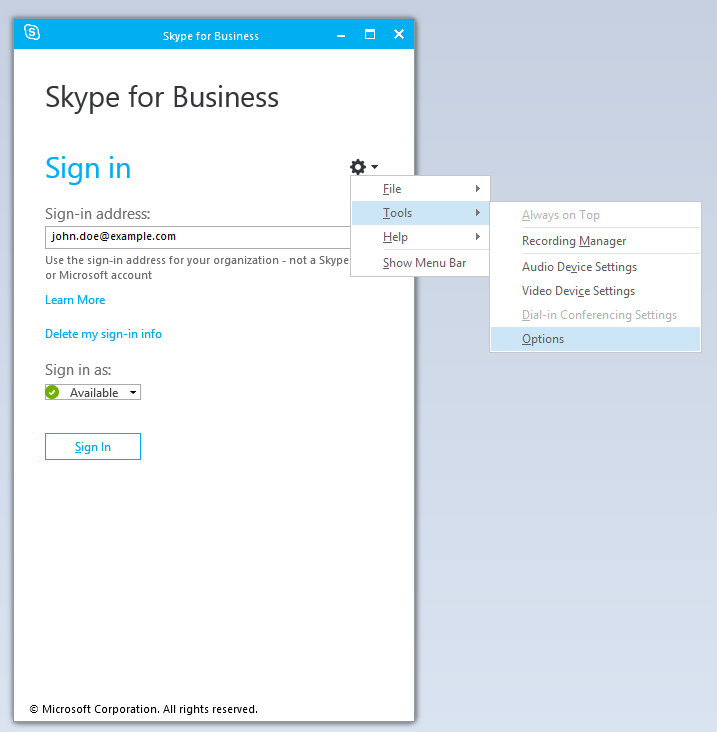
Open the program and then click on the gear icon near the top, right side of
the window.
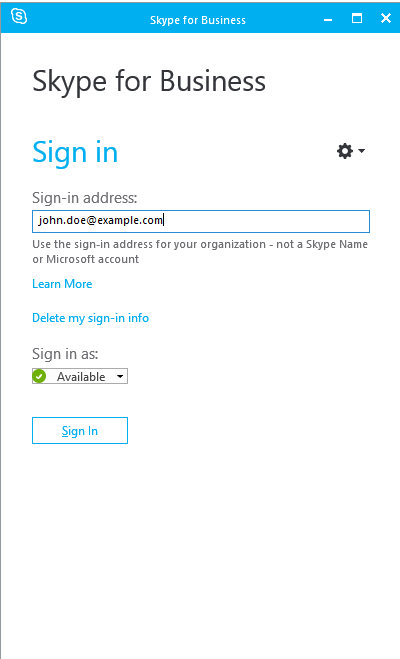
- Choose Tools and Options.
-
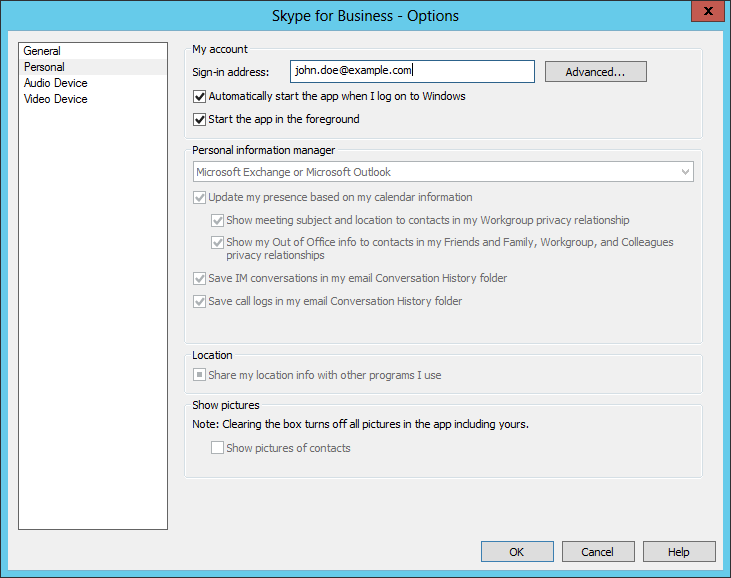
Uncheck the option for "Automatically start the app
when I log on to Windows" under the Personal options to prevent
the program from restarting automatically upon a login to the system,
then click on OK to apply the change after unchecking that
option.
[/os/windows/software]
permanent link
Tue, Mar 03, 2026 3:33 pm
Adding the capability to save webpages as a single file to Firefox
The Firefox web
browser does not have the capability to save the contents of a webpage to a
single file, such as an
MHTML file, which is
a web archive file format that allows one to save the
HTML code, images
etc. on a webpage into a single file.
Though the capability is absent from Firefox, you can add the functionality
of saving a page to a single file by installing
Save
Page WE, an
add-on for Firefox
by DW-dev. The
extension provides the capability to "Save a complete web page (as
currently displayed) as a single HTML file that can be opened in any browser.
Save a single page, multiple selected pages or a list of page URLs. Automate
saving from command line." The saved file is not an MHTML file,
or one of the other common
web
archiving file formats, but it
is a single HTML file that Firefox and other browsers can read.
Save Page WE is implemented using the
WebExtensions API and is available for both Firefox and
Chrome with
identical functions and user interfaces.
When you start the installation process, you will see a list of the
permissions required by the extension:
- Access your data for all websites
- Download files and read and modify the browser's download history
- Display notifications to you
- Access browser tabs
- Access browser activity during navigation
Click on the Add button to add the extension. You should then
see the message "Save Page WE was added. Update permissions and data preferences any time in the extension settings." You also have the option to pin the
extension to the toolbar.
Select the option to pin the extension to the toolbar, which will
result in an icon of a 3.5" floppy disk appearing on the toolbar.
You can click on that icon to save the page displayed in the current
browser tab.
You can also save a page by hitting the Alt+A key
combination (you can cancel the saving of a page with At+C).
The file format is HTML rather than MHTML, so the
file extension
used by SavePageWE is .html, which Firefox can open — if you try to open
a file with the .mhtml extension, Firefox will prompt you to use another
application to open the file.
Anyone who wishes to have the ability to save a webpage as a single file
added to Firefox, can add their voice to the post at
Add native Web Archive File support to Firefox, including MHTML, MAFF, and
Webarchive...
References
-
How to save a webpage as .mhtml with Firefox?
Last updated: September 15, 2024
superuser
-
Add native Web Archive File support to Firefox, including MHTML, MAFF, and
Webarchive...
Date: August 15, 2023
By:
JohnBoyTheGreat
moz://a Connect
[ More Info ]
[/network/web/browser/firefox/addons]
permanent link
Mon, Mar 02, 2026 11:11 pm
Turning off Fast Startup on a system running Microsoft Windows
Microsoft Windows 8 introduced a feature called
Fast Startup. The feature was a variation of hibernate mode, but when
enabled would close all running programs and log the user out before
hibernating. This feature would result in a user being able to log in
more quickly when a system is powered back on after a shutdown. There may
be cases where use of this feature is not desirable, however. E.g., if the
user wants to boot the system into
Linux, but still access data
on the Windows boot drive. To turn fast startup off, you can take the
following steps:
-
Type
Control Panel in the Windows Search field
at the bottom of the screen.
-
Click on System and Security.
-
Click on Change what the power buttons do under Power
Options.
-
Click on Change settings that are currently unavailable.
If prompted for administrator credentials, provide those for
an administrator account.
-
Uncheck the check box next to "Turn on fast startup (recommended)".
-
Click on Save changes. You can then close the window.
[ More Info ]
[/os/windows]
permanent link
Sun, Mar 01, 2026 10:55 pm
Controlling whether a scrollbar appears in a tab in a Terminal window
I needed to scroll back through a tab I had open in a
Terminal window on
an
Ubuntu Linux system,
but there was no
scrollbar on the right side of the tab in which I had run the command,
though a scrollbar was open in other Terminal tabs. I was able to get the
scrollbar to appear by clicking on the icon with 3 horizontal bars at
the top of the Terminal window and then selecting
Preferences.
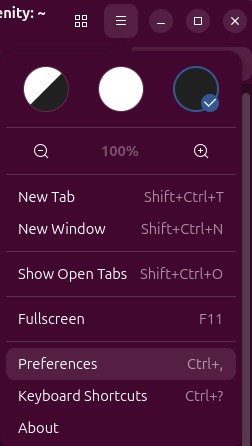
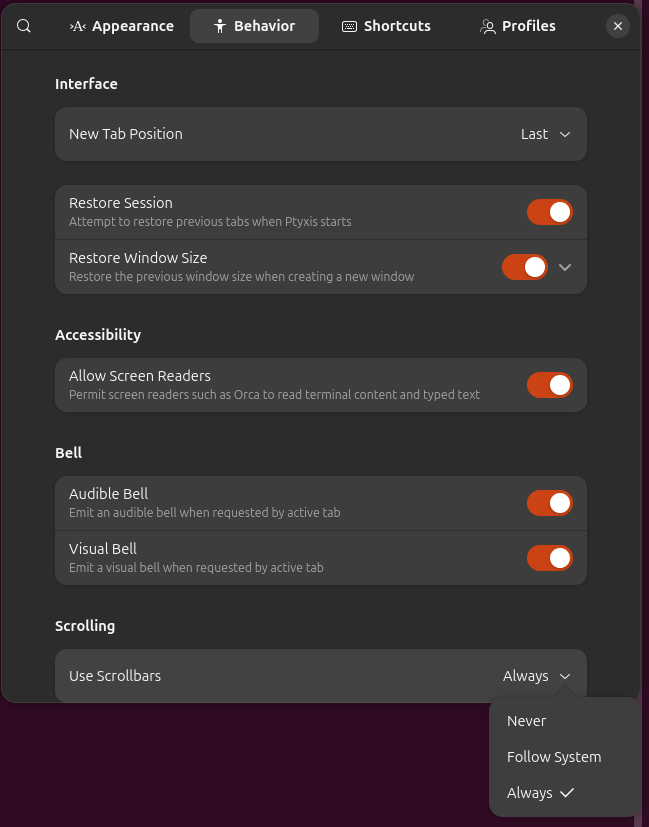
Then from the Behavior tab, I changed the setting from
Follow System to Always, which resulted in the
scrollbar appearing where it had been missing, but I could not scroll
back any further than the text that had been appearing in the tab
before I changed the settiing and that remained the same whenever
I issued another command and text moved upwards, so that I could no
longer see it or scroll back to see it, so I closed the tab.
When I opened another tab, the scrollbar was there and operated
as expected.
[/os/unix/linux/ubuntu]
permanent link
Sat, Feb 28, 2026 8:29 pm
Creating a desktop shortcut under Ubuntu for a Windows app runnning under Wine
From a CD, I
installed
Microsoft Office 2007 under
Wine, so that
my wife could edit her
Microsoft
Publisher files on an
Ubuntu Linux system. I also installed
Microsoft Excel
and Microsoft Word.
All three seemed to be working OK when I checked them after the
installation completed. I was able to open the programs from the
File Explorer by
issuing the command wine explorer from a
shell prompt in
a Terminal window
and then navigating to the directory,
C:\Program Files (x86)\Microsoft Office\Office12, where the
applications were located. I could also start Publisher by issuing the command
below in a Terminal window:
wine "/home/alice@Wonderland/.wine/drive_c/Program Files (x86)/Microsoft Office/Office12/MSPUB.EXE"
To make it easer for my wife to open Publisher, though, I created a
shortcut on her Ubuntu desktop. To create a shortcut you can take the
following steps:
Open a Terminal
window and create a new .desktop file on your desktop. You can use
the nano
editor or another text
editor to create the file. E.g., nano
~/Desktop/AppName.desktop.
You then need to have lines like the following ones in the file:
[Desktop Entry]
Name=Name of Your Application
Exec=wine "/home/username/.wine/drive_c/Program Files/AppName/app.exe"
Type=Application
Icon=wine
Terminal=false
StartupNotify=true
You need to use the absolute path the the .exe file for the program and,
if the directory
path contains a space, you must enclose the path within quotes. Also,
you need to replace username with your username on the system.
For Publisher, I could use the following lines:
[Desktop Entry]
Name=Publisher
Exec=wine "/home/alice@Wonderland/.wine/drive_c/Program Files (x86)/Microsoft Office/Office12/MSPUB.EXE"
Type=Application
Icon=wine
Terminal=false
StartupNotify=true
If you use the nano text editor, you can hit Ctrl+X, the
Y, then Enter to save the file. You then need to make
the shortcut executable, which you can do by right-clicking on the file
on the desktop, selecting Properties, and then makng sure "Executable
as Program" is on. Or you can use the
chmod command to make
the file excutable by a command like chmod +x ~/Desktop/AppName.desktop
. You then need to permit launching of the application from the shortcut
by right-clicking on it and selecting Allow Launching.
[ More Info ]
[/os/unix/linux/wine]
permanent link
Fri, Feb 27, 2026 3:41 pm
Wine window becoming transparent with an attempt to resize it
My wife was using Advanced Diary for
journaling on a Microsoft Windows system, but wanted to transition to
Linux, so I installed
Ubuntu Linux and then,
since there is no Linux version of Advanced Diary, I installed
Advanced Diary under
Wine. She wanted to adjust the size of the Advanced Diary window, but when
she attempted to adjust the window size by clicking on the
Restore Down icon at the top right side of the
window (between the dash and the "X"), the Advanced Diary window became
transparent and it was not possible to close it or adjust the size of the
transparent box that appeared for the Advanced Diary window.
So I had to open a
Terminal window to determine the
process ID (PID)
of the Advanced Diary process with the
ps and then kill that
process with the
kill command. I could also have used the
killall command
killall AdvancedDiary.exe.
I tried closing and opening the program several times. The behavior
was consistent — the window would become transparent whenever
I tried resizing or minimizing the window.
If you are using the
GNOME desktop, you can use the steps below to try to resolve the problem.
GNOME is the default desktop environment for Ubuntu, but you can verify
it is the desktop in use by the command echo $XDG_CURRENT_DESKTOP.
Steps that may resolve the problem:
-
Run winecfg in a Terminal window.
-
In the Wine configuration window, click on the Graphics
tab.
-
Toggle the settings for "Allow the window manager to decorate the windows"
and "Allow the window manager to control the windows" one by one to see if
one of those settings change the behavior. When I toggled off "Allow the
window manager to decorate the windows", I now no longer saw the icons
to adjust the size of the window or minimize the window at the top of the
Wine window for Advanced Diary, but when I clicked where I expected them
to appear, the window became transparent again. I toggled the setting back
on and then toggled off the "Allow the window manager to control the
windows" setting. That resolved the problem. I then closed the window
and reopened Advanced Diary and toggled that setting on again, also, so
that both settings were checked. I could still adjust the window size
as expected. I closed and reopened the application several times
and was still able to adjust the window size, so just toggling the
"Allow the window manager to control the windows" setting off and
then back on seemed to resolve the problem.
[ More Info ]
[/os/unix/linux/wine]
permanent link
Thu, Feb 26, 2026 10:31 pm
Restarting the Windows audio service
If you are experiencing problems with sound on a Microsoft Windows system,
such as being unable to hear audio even when the sound hasn't been muted
and any external speakers are turned on and set to an audible volume level,
one possible way to resolve the problem is to restart the
Windows Audio service. To do so, you can can take the following steps:
- Type
services in
the Windows Search field. You should see it returned by the search
utility. Click on "Run as administrator" and provide the login credentials
for an account that has adminisrator privileges.
- When the Services window opens, scroll
down until you see Windows Audio.
- Right-click on the entry and choose "Restart".
- When the status for the service returns to "Running",
you can close the Services window.
[ More Info ]
[/os/windows]
permanent link
Wed, Feb 25, 2026 11:57 pm
Configuring Sendmail to listen on the mail submission port
Sendmail is an
email server application that is available for many operating systems.
It will listen on
TCP
port 25 for connections from other mail servers that use the
Simple
Mail Transfer Protocol for email transmissions. As
a message
submission agent (MSA), another common port it listens on is TCP port 587
for email transmissions from users' email clients. On a
Linux system you can use the
netstat or
ss
commands to determine if a system is listening for connections on a
particular port. When I checked a Sendmail server to determine whether it
was listening on port 587, I could see that it was not listening on that
port, though that was needed.
# netstat -an | grep 587
# ss -ln | grep ":587 "
#
When I searched /etc/mail/sendmail.mc for
RELAY_MAILER_ARGS, I saw the following
lines, which are needed to have Sendmail listen for email transmissions
from users on TCP port 587, were already present and were not commented out:
define(`RELAY_MAILER_ARGS', `TCP $h 587')
define(`ESMTP_MAILER_ARGS', `TCP $h 587')
When I searched for DAEMON_OPTIONS, I saw the following:
dnl # The following causes sendmail to additionally listen to port 587 for
dnl # mail from MUAs that authenticate. Roaming users who can't reach their
dnl # preferred sendmail daemon due to port 25 being blocked or redirected find
dnl # this useful.
dnl #
dnl DAEMON_OPTIONS(`Port=submission, Name=MSA, M=Ea')dnl
I removed the dnl from the begining of the line so that
I then had the line below, instead:
DAEMON_OPTIONS(`Port=submission, Name=MSA, M=Ea')dnl
I then rebuilt /etc/sendmail/mc and restarted the Sendmail
service.
# m4 /etc/mail/sendmail.mc > /etc/mail/sendmail.cf
# service sendmail restart
Redirecting to /bin/systemctl restart  sendmail.service
#
I could then see that the system was listening for connections on port
587.
[ More Info ]
[/network/email/sendmail]
permanent link
Tue, Feb 24, 2026 4:06 pm
Installing Advanced Diary on a Linux system with Wine
I needed to install Advanced Diary
on an Ubuntu Linux system.
for someone who had been using the program for journaling on a Microsoft Windows
system. I had previously installed
Wine, a program that
allows one to run Windows applications on
Linux,
macOS, and
FreeBSD
systems. I used AdvDiary.sh, which
contains the following lines, to install Advanced Diary:
#!/usr/bin/env bash

set -e

if [ -z "$1" ]; then
  echo "Usage: $0 AdvancedDiarySetup.exe"
  exit 1
fi

INSTALLER="$(realpath "$1")"
PREFIX="$HOME/.wine-advdiary"

echo "Creating 32-bit Wine prefix..."
export WINEPREFIX="$PREFIX"
export WINEARCH=win32
winecfg -v win7 >/dev/null 2>&1 || true

echo "Installing required components (gdiplus, corefonts)..."
winetricks -q gdiplus corefonts

echo "Forcing native GDI+..."
cat > "$PREFIX/user.reg" <<'EOF'
[Software\\Wine\\DllOverrides]
"gdiplus"="native"
EOF

echo "Running Advanced Diary installer..."
wine "$INSTALLER"

echo
echo "✔ Installation complete"
echo "Run with:"
echo "WINEPREFIX=$PREFIX wine \"$PREFIX/drive_c/Program Files/Advanced Diary/Diary.exe\""
To run it, you need to assign "execute" permission to the file, which can be
done in a Terminal
window with chmod + x filename or chmod a+x
filename to make a file executable by all users or
chmod u+x filename to make it executable by just the owner
of the file, i.e., the user.
alice@Wonderland:~/Downloads$ chmod u+x install-advanced-diary.sh
alice@Wonderland:~/Downloads$
When I ran the shell
script .sh file, I realized I hadn't installed
Winetricks beforehand, so I installed it with
sudo apt install winetricks after running the script.
I then reran the installation script for Advanced Diary. The installation
completed successfully — I selected the option to have the program
opened automatically at the conclusion of the installation — and it
appeared to open normally (I had to press Enter in the terminal
window to return to the shell prompt).
[ More Info ]
[/os/unix/linux/wine]
permanent link
Mon, Feb 23, 2026 10:05 pm
Determining if a drive is encrypted with Bitlocker on a Windows system
If you need to determine if a drive in a Microsoft Windows system or connected
to it via USB is
BitLocker encrypted, you
can use the
manage-bde utility. To use the program, open a
command prompt window with
administrator privileges and then issue the command
manage-bde -status to see the status of all drives. To see just
the status of one drive, e.g., C:, you could use manage-bde -status
C:.
C:\Windows\System32>manage-bde -status c:
BitLocker Drive Encryption: Configuration Tool version 10.0.26100
Copyright (C) 2013 Microsoft Corporation. All rights reserved.

Volume C: [Windows]
[OS Volume]

    Size:                 14826.87 GB
    BitLocker Version:    None
    Conversion Status:    Fully Decrypted
    Percentage Encrypted: 0.0%
    Encryption Method:    None
    Protection Status:    Protection Off
    Lock Status:          Unlocked
    Identification Field: None
    Key Protectors:       None Found


C:\Windows\System32>
[ More Info ]
[/os/windows/commands]
permanent link
Sun, Feb 22, 2026 3:38 pm
Running the Big Fish Games Manager on an Ubuntu system
You can run the Big
Fish Games Game Manager on an
Ubuntu Linux system
under Steam.
You can install Steam as a
Snap package
from the Ubuntu App Center.
Steps:
-
Download the Big Fish Games App (Game Manager) for PC
-
In Steam on the Ubuntu system, click on Add a Game, which is
at the lower, left-hand corner of the Steam window, then
select Add a Non-Steam Game, then browse to where you downloaded
the .exe installer for the game manager, click on it, and then
click on Add Selected Programs.
-
You should then see the Big Fish Game Manager in the "Uncategorized" list
of games at the left side of the Steam window, e.g., you may see
bfginstaller32_s1_l1.exe listed. Right-click on it and then select
Properties, then Compatibility, and then, from the
drop-down list that becomes available, select Proton Experimental
or the latest stable version — I selected Proton Experimental.
-
You can then close the Compatibility window by clicking on the
"X" at the upper, right-hand corner.
-
Then with the Big Fish Game Manager selected in the Uncategorized
list, click on the Play button to launch the Big Fish Game Manager
Setup and agree to the License Agreement when you see it appear.
When I started the install process, the installation appeared to hang at
"Execute: C:\Program Files (x86)\bfglient\epoch.exe". When I clicked on the
title bar for the window, I saw "About Wine", so it appeared to be using
Wine, which I had
previously installed on the Ubuntu system.
But I waited and eventually the installation succeeded, though I think it
took over 15 minutes. I closed the window and then went back to the
Steam window, I saw bfginstaller32_s1_l1.exe was still there. This time
when I clicked on it, the Big Fish window where I could sign in to Big
Fish Games opened fairly quickly.
Note: if the window goes blank or displays just a white background,
minimize it by clicking on the "-" in the upper, right-hand corner of
the Big Fish window and then switch to it again, which you can do with
Alt+Tab — continue to press the Tab key while
continuing to hold down the Alt key to cycle between open open
windows until you get to the Big Fish window.
Initially, you will see "No games to play," but if you have already
purchased games that you've played on another system, you can click
on Purchase History and install them on the Linux system.
When I installed the Big Fish Games Manager under Steam, I had my wife
check one of her games, Aquascapes, and that ran fine. I then closed
the Big Fish window and the Steam window and reopened it. Note: if
you want to change the name that appears for Big Fish Games in the
Uncategorized list, you can right-click on the entry, e.g.,
bfginstaller32_s1_l1.exe, and choose Properties and then change
the "Shortcut" value to something you prefer, such as "Big Fish Games".
When I reopened Steam and started Big Fish Games, I saw the Aquascapes
game under "My Games".
[ More Info ]
[/os/unix/linux/ubuntu]
permanent link
Sat, Feb 21, 2026 10:37 pm
Mounting a network drive under Ubuntu Linux
To access a directory that is shared from a Microsoft Windows system in a
Windows domain, you
can take the following steps on a
Ubuntu Linux system.
Note: you will need to have a package installed that provides
Server Message
Block (SMB) support. If the libsmclient0 package is installed, you should be
able to use these steps. You can check if it is installed by opening
a Terminal window and
issuing the command dpkg -s libsmbclient0.
If it is not installed, you can install it with sudo apt install
libsmbclient0.
alice@Wonderland:~$ dpkg -s libsmbclient0
Package: libsmbclient0
Status: install ok installed
Priority: optional
Section: libs
Installed-Size: 259
Maintainer: Ubuntu Developers <ubuntu-devel-discuss@lists.ubuntu.com>
Architecture: amd64
Multi-Arch: same
Source: samba
Version: 2:4.22.3+dfsg-4ubuntu2.2
Replaces: libsmbclient
Provides: libsmbclient (= 2:4.22.3+dfsg-4ubuntu2.2)
Depends: samba-libs (= 2:4.22.3+dfsg-4ubuntu2.2), libbsd0 (>= 0.0), libc6 (>= 2.38), libndr6 (>= 2:4.17.2), libtalloc2 (>= 2.0.4~git20101213), libtevent0t64 (>= 0.15.0)
Breaks: libsmbclient (<< 2:4.22.3+dfsg-4ubuntu2.2)
Description: shared library for communication with SMB/CIFS servers
 This package provides a shared library that enables client applications
 to talk to Microsoft Windows and Samba servers using the SMB/CIFS
 protocol.
Homepage: https://www.samba.org
Original-Maintainer: Debian Samba Maintainers <pkg-samba-maint@lists.alioth.debian.org>
alice@Wonderland:~$
[ More Info ]
[/os/unix/linux/ubuntu]
permanent link
Fri, Feb 20, 2026 11:01 pm
Clearing the cache for a webpage displayed in Firefox
I had opened an
HTML file
in the
Firefox browser
and needed to refresh the display of the file, which was using a
CSS file located on a
remote web server, after the remote CSS file had changed. Clicking on
the refresh/reload button on the Firefox navigation bar or pressing the
F5 key would show changes I made to the local file, but would not
reflect changes to the remote CSS file, which was
cached
on the local system's disk drive.
You can remove a cached
CSS
for a specific webpage by performing a forced reload of that webpage.
A forced reload tells Firefox to ignore the cached files and download fresh
copies from the server. The keyboard shortcut, which works on Linux, is to
hold down Ctrl + Shift + R or Ctrl + F5. Alternatively, you can hold
the Shift key and click the Reload button on the navigation toolbar.
This is usually the quickest solution for a single page.
[/network/web/browser/firefox]
permanent link
Thu, Feb 19, 2026 9:43 pm
Listing all accounts on an Ubuntu Linux system
If you need to list all of the accounts on an
Ubuntu Linux system, there
are many commands that you can use.
cat /etc/passwdgrep -oE '^[^:]+' /etc/passwd - for just the account namescut -d: -f1 /etc/passwd - for just the account namesawk -F: '{print $1}' /etc/passwd - for just the account names
lsloginscompgen -u - for just the accunt namesgetent passwd
[ More Info ]
[/os/unix/linux/ubuntu]
permanent link
Wed, Feb 18, 2026 4:01 pm
Determining the amount of memory in a system running Ubuntu Linux
If you need to determine the amount of memory in a system that is running
the Ubuntu Linux
operating
system (OS), you can open a
Terminal
window from the App Center and then use the free command.
If you use the command without any options, you will see the amount
of memory displayed in
bytes. To display the value in a more human-friendly format, you
can add the argument -h or --human, e.g.,
to see the value in
gigabytes.
alice@firefly:~$ free -h
               total        used        free      shared  buff/cache   available
Mem:            14Gi       2.4Gi        10Gi       426Mi       2.3Gi        12Gi
Swap:          4.0Gi          0B       4.0Gi
alice@firefly:~$
Other options for the command are shown below:
jim@Serenity:~$ free --help

Usage:
 free [options]

Options:
 -b, --bytes         show output in bytes
     --kilo          show output in kilobytes
     --mega          show output in megabytes
     --giga          show output in gigabytes
     --tera          show output in terabytes
     --peta          show output in petabytes
 -k, --kibi          show output in kibibytes
 -m, --mebi          show output in mebibytes
 -g, --gibi          show output in gibibytes
     --tebi          show output in tebibytes
     --pebi          show output in pebibytes
 -h, --human         show human-readable output
     --si            use powers of 1000 not 1024
 -l, --lohi          show detailed low and high memory statistics
 -L, --line          show output on a single line
 -t, --total         show total for RAM + swap
 -v, --committed     show committed memory and commit limit
 -s N, --seconds N   repeat printing every N seconds
 -c N, --count N     repeat printing N times, then exit
 -w, --wide          wide output

     --help     display this help and exit
 -V, --version  output version information and exit

For more details see free(1).
jim@Serenity:~$
Note:The
free command in Linux shows the total amount of installed physical memory in the total column, but this value is less than the actual hardware
random-access
memory (RAM) installed because the Linux
kernel
reserves a portion of memory for itself and for hardware devices (like video
card buffers) at boot time. The total shown is the usable RAM available to the
OS, not the absolute hardware total.
[
More Info ]
[/os/unix/linux/ubuntu]
permanent link
Tue, Feb 17, 2026 1:53 pm
Adding and removing users from the sudoers list on an Ubuntu Linux system
On a Ubuntu Linux system,
you can determine which users are allowed to use the
sudo command by looking
at the contents of the /etc/group file. If you
grep for sudo
you will see which accounts on the system can use the command.
jack@firefly:~$ grep sudo /etc/group
sudo:x:27:jack,jill@ad.example.com
jack@firefly:~$
The above output shows that the local jack account and a
Windows domain
account, jill@ad.example.com, can use the command.
You can see what groups a particular user belongs to with the command
groups username, where username is the user's
account name.
jack@firefly:~$ groups jill@ad.example.com
jill@ad.example.com : domain users@ad.example.com ra_allowmediaaccess@ad.example
.com ra_allowcomputeraccess@ad.example.com ra_allowaddinaccess@ad.example.com ra
_allowshareaccess@ad.example.com ra_allowremoteaccess@ad.example.com wssusers@ad
.example.com ra_allowvpnaccess@ad.example.com ra_allowhomepagelinks@ad.example.c
om
jack@firefly:~$ groups jack
jack : jack adm cdrom sudo dip plugdev users lpadmin
jack@firefly:~$
You can also determine if a user has sudo privilege using
groups username | grep -c sudo. If the result is 0, then
the user does not have that privilege. If the result is 1, inciding that
the grep command found username one in the output of the groups command,
then the user has that privilege.
jack@firefly:~$ groups jill@ad.example.com | grep -c sudo
1
jack@firefly:~$
You can grant a user that privilege by issuing the command
sudo usermod -aG sudo username from an account that already
has the capability to run the sudo command.
jack@firefly:~$ sudo usermod -aG sudo mary
[sudo: authenticate] Password:
jack@firefly:~$
You can remove a user's account from the list of those allowed to run
the command using the
gpasswd
command, which is part of the sysutils package by issuing the command
sudo gpasswd -d username sudo.
jack@firefly:~$ sudo gpasswd -d mary sudo
Removing user mary from group sudo
jack@firefly:~$ groups mary | grep -c sudo
0
jack@firefly:~$
[ More Info ]
[/os/unix/linux/ubuntu]
permanent link
Sun, Feb 15, 2026 8:49 pm
Putting the current date into a text variable in YYMMDD format in Python
To obtain the current date in Python and put it into a text variable in
YYMMDD format, you can use the
datetime module and
the
strftime() method.
Python Code:
from datetime import date

# Get today's date as a date object
today = date.today()

# Format the date into a string variable in YYMMDD format
# %y gives the two-digit year, %m gives the zero-padded month, and %d gives the # zero-padded day formatted_date_string = today.strftime("%y%m%d")

# Print the result (optional, for verification)
print(f"Today's date in YYMMDD format: {formatted_date_string}")
Steps:
from datetime import date:
This line imports the date class from the built-in
datetime module, which is necessary to work with dates
in Python.today = date.today(): This uses the
today() method to get the current local date as a date
object.today.strftime("%y%m%d"):
The strftime() method is then applied to the
today object to format it into a string. The format
string uses specific directives:
%y: Represents the year without the century
(e.g., 26 for 2026).%m: Represents the month as a zero-padded
decimal number (e.g., 02 for February).%d: Represents the day of the month as a
zero-padded decimal number (e.g., 15 for the
15th).
The resulting string, stored in formatted_date_string,
will look like 260215 (for February 15, 2026)
[/languages/python]
permanent link
Sat, Feb 14, 2026 7:02 pm
Changing the time zone on a Microsoft Windows system from the command line
The timezone on a Microsoft Windows system can be changed from the
command line
by
opening a command prompt window
with administrator privileges and then typing
timedate.cpl and
hitting
Enter, which opens a window where you can alter the
timezone or you can use the
tzutil utility to
change the time zone using a command of the form
tzutil /s
"TimeZone"
where
TimeZone is the appropriate time zone
identifier, e.g.,
tzutil /s "Eastern Standard Time".
[ More Info ]
[/os/windows/commands]
permanent link
Fri, Feb 13, 2026 9:45 pm
Installing OpenSSH Server software on a Windows 10 system with PowerShell
OpenSSH Server for
Windows 10 requires at
least Windows 10 (build 1809).
You can determine the build number for Windows 10 by typing winver
in the Windows "Type here to search" field at the bottom of the screen or
at a
PowerShell prompt. Or
you can use the
systeminfo utility and pipe it's output into the
findstr command, filtering
on the line that has "OS" at the beginning of the line and also "Version" in
the line.
PS C:\> systeminfo | findstr -B "OS" | findstr "Version"
OS Version:                10.0.19045 N/A Build 19045
PS C:\>
The SSH Client software may already be installed. You can determine if
it is already installed by opening a PowerShell prompt and typing
ssh. If it is installed, as it was on the Windows 10 Professional
Version 22H2 (OS Build 19045.6466) system on which I wanted to set up
the OpenSSH Server software, you will see a response like the following one:
PS C:\> ssh
usage: ssh [-46AaCfGgKkMNnqsTtVvXxYy] [-B bind_interface] [-b bind_address]
           [-c cipher_spec] [-D [bind_address:]port] [-E log_file]
           [-e escape_char] [-F configfile] [-I pkcs11] [-i identity_file]
           [-J destination] [-L address] [-l login_name] [-m mac_spec]
           [-O ctl_cmd] [-o option] [-P tag] [-p port] [-Q query_option]
           [-R address] [-S ctl_path] [-W host:port] [-w local_tun[:remote_tun]]
           destination [command [argument ...]]
PS C:\>
[ More Info ]
[/os/windows/network/ssh/OpenSSH]
permanent link
Sun, Feb 08, 2026 4:29 pm
Checking an NVMe drive's status in Ubuntu Linux with nvme-cli
You can check the health of a
NVM Express (NVMe)
drive on an Ubuntu Linux
system using the nvme-cli
command-line
interface (CLI) application. The description for the package is as follows:
NVMe management command line interface
nvme-cli is a NVMe management command line interface. NVM Express™
(NVMe™) is a specification defining how host software communicates with
non-volatile memory across a PCI Express® (PCIe®) bus. It is the industry
standard for PCIe solid state drives (SSDs) in all form factors (U.2,
M.2, AIC, EDSFF).
You can install nvme-cli throught the App Center on a Ubuntu Linux
system.
[ More Info ]
[/os/unix/linux/ubuntu]
permanent link
Fri, Feb 06, 2026 3:36 pm
Downloading YouTube videos on a Windows system with yt-dlp
YouTube recently
changed its website (around January 4, 2026) so that programs that worked in
the past for downloading YouTube videos, such as
StreamFab,
no longer work. My wife and I like to archive YouTube videos we find that
have useful information we might wish to refer to again in the future,
since we've sometimes found that when we try to view them again on
YouTube that a channel where they were posted has disappeared along with
all its videos. We have a YouTube premium subscription, which allows
one to download videos, but they are stored in a blob file where they
are not accessible to programs we use to view videos and there is no
guarantee they will remain accessible even in YouTube's limited offline
viewing method when a channel disappears. So we were very perturbed that
YouTube has now made it very difficult to archive videos. StreamFab has been
working very well for my wife and is easy to use, but I needed to look
for an alternative for her. A couple of sites that still work that
allow one to download YouTube videos are listed below, but downloading
through those websites is slower and she found that for fairly large
videos the downloads would fail.
https://ytdown.to/en2/
https://v6.www-y2mate.com/
Since I had WinPython, a
free and
open-source version of the
Python programming language installed on a Windows laptop and she is
using a Windows 11 system at the moment, though she wants to switch to
Linux, I decided to try
the yt-dlp
Python program that allows one to download YouTube videos from a
command-line
interface (CLI).
[ More Info ]
[/video/youtube]
permanent link
Mon, Feb 02, 2026 10:07 pm
Adding the capability to save webpages as a single file to Firefox
The
Firefox
web browser does not have the capability to save the
contents of a webpage to a single file, such as an
MHTML file,
which is a web archive file format that allows one to save
the
HTML
code, images etc. on a webpage into a single file.
Though the capability is absent from Firefox, you can add the
functionality of saving a page to a single file by installing
Save
Page WE, an
add-on for Firefox by
DW-dev.
The
extension provides the capability to "Save a complete web page
(as currently displayed) as a single HTML file that can be opened
in any browser. Save a single page, multiple selected pages or
a list of page URLs. Automate saving from command line." The
saved file is not an MHTML file, or one of the other common
web
archiving file formats, but it is a single HTML file that Firefox
and other browsers can read. Save Page WE is implemented using the
WebExtensions API and is available for both Firefox and
Chrome with
identical functions and user interfaces.
[ More Info ]
[/network/web/browser/firefox]
permanent link
Sun, Feb 01, 2026 3:27 pm
Viewing Payment Details for a Loan in the Desktop Version of Quicken
If you automatically update a loan's balance by downloading transactions
from a bank's website, when you click on "Payment Details" in the Windows
Classic Business & Personal desktop version of Quicken, you won't
be able to actually view details on payments, such as the amount of
principal and interest paid for each transaction. You can change the loan
account's settings in Quicken to stop automatically updating the account
by right-clicking on the account and then selecting "Edit/Delete account"
then clicking on the "Online Services" tab and then clicking on the
"Deactivate" button in the online setup portion of the window. When asked
"Would you like to deactivate this service?", click on "Yes". You can
then close the "Account Details" window. Then, when you choose "Payment
Details", you should see the individual transactions for the account and
you will be able to modify the opening balance, principal and interest
for payments, if needed. If you then want to transfer money from another
account, such as a checking account, as a payment on the loan, you may
not see the account listed as one of the transfer options in the dropdown
list for transfers, but if you type the account name in the Category field
exactly as it appears in the account list and then hit the
Tab
key, the amount you specify will be transferred to the loan account.
[/financial]
permanent link
Wed, Jan 28, 2026 2:57 pm
Masquerading a "from" address with sendmail
Many years ago, I distributed email to the mailing list for an
organization through my email server. The person who sent out a monthly
newsletter to the members of the organization had a Verizon email address
and would send the newsletter via my server running
Sendmail, which would
then send the mail onwards to the organization's members. Since my server
wasn't a designated email server for verizon.net addresses, I configured
Sendmail to change the "from" domain to my server's domain name, moonpoint.com,
so the sending address wouldn't be johnslartibartfast444@verizon.net but would
be johnslartibartfast444@moonpoint.com; otherwise many recipients' email
servers would reject the email since it didn't come from an email server
designated to send email for verizon.net users. I put the following lines in
/etc/mail/sendmail.mc (the last two lines are the ones I added to the
Masquerade section of the file):
dnl # The following example makes mail from this host and any additional
dnl # specified domains appear to be sent from mydomain.com
dnl #
dnl MASQUERADE_AS(`mydomain.com')dnl
dnl #
dnl # masquerade not just the headers, but the envelope as well
dnl #
dnl FEATURE(masquerade_envelope)dnl
dnl #
dnl # masquerade not just @mydomainalias.com, but @*.mydomainalias.com as well
dnl #
dnl FEATURE(masquerade_entire_domain)dnl
dnl #
dnl MASQUERADE_DOMAIN(localhost)dnl
dnl MASQUERADE_DOMAIN(localhost.localdomain)dnl
dnl MASQUERADE_DOMAIN(mydomainalias.com)dnl
dnl MASQUERADE_DOMAIN(mydomain.lan)dnl
MAILER(smtp)dnl
MAILER(procmail)dnl
dnl MAILER(cyrusv2)dnl
MASQUERADE_DOMAIN(`verizon.net')dnl
MASQUERADE_AS(`moonpoint.com')dnl
After I edited the sendmail.mc file, I rebuilt the sendmail.cf
file by restarting sendmail with the command service sendmail
restart , which put the following line in sendmail.cf:
C{M}verizon.net
The person who was sending the newsletter died several years ago
and I took over maintaining the membership list for the organization as
well as distributing the email version of the newsletters to members.
Though the account from which the newsletter is sent is intended to be
used only for sending the newsletter and members are advised to send an
email related to the organization to the organization's Gmail email addresses,
occasionally members will reply directly to the "from" address used for
the newsletter. When checking the account for that address, I found that someone
with a verizon.net address had sent a reply to the account, but if I replied
my reply would go not to his verizon.net address, but to his email name
followed by my domain name, which would result in the email bouncing since
that address would not be a valid address on my server. I corrected the
problem by removing the two MASQUERADE lines in sendmail.mc that resulted
in the change to the domain name part of email addresses if any email
came from a verizon.net address and then restarted sendmail, which resulted
in the C{M}verizon.net line being removed from sendmail.cf.
The sendmail.mc file is a human-readable macro configuration file, while the sendmail.cf file is the more complex configuration file actually used by the
Sendmail message
transfer agent (MTA). The .mc file serves as the source, which is processed
by the m4
macro to generate the final, often uncommented sendmail.cf file used by
sendmail. The command m4 /etc/mail/sendmail.mc > /etc/mail/sendmail.cf
can be used to rebuild the .cf configuration file after one makes
changes to the sendmail.mc file, but the changes won't take effect until
sendmail is restarted. Or, on many newer versions of the Linux operating
system, one can simply restart sendmail and a new .cf file will be
automatically generated and applied to sendmail, if any changes have been made
to the .mc file
References:
-
18.4. The sendmail.cf and sendmail.mc Files
Linux Network Administrators Guide
Related articles:
-
Modifying the "from" domain of a message with sendmail
Date: June 1, 2018
[/network/email/sendmail]
permanent link
Sun, Jan 18, 2026 4:51 pm
Installing Calibre on Ubuntu Linux
I installed Calibre
8.8.0 on a Ubuntu Linux
system through the Ubuntu App Center (I had to filter by Debian packages
rather than by Snap
packages in the App Center to see Calibre packages as there isn't a Snap
package for the
software). But when I checked to see if that was the latest version on the
Calibre website, I found the latest version is 8.16.2. Also, the
Calibre Download for
Linux page states "Please do not use your distribution provided
calibre package, as those are often buggy/outdated. Instead use the
Binary install described below." So I uninstalled the version I installed and
then reinstalled the software using the command provided on that
Calibre webpage, sudo -v && wget -nv -O-
https://download.calibre-ebook.com/linux-installer.sh | sudo sh
/dev/stdin - a command that can be run on any version of Linux.
[ More Info ]
[/ebook/calibre]
permanent link

Privacy Policy
Contact


